Avocad starts from brand, product, and campaign context rather than a blank design canvas.
Comparison guide
Avocad vs Canva: design suite or ad creative workflow?
Canva is useful for broad design tasks. Avocad is focused on turning campaign context into ad creative variants for review and testing.
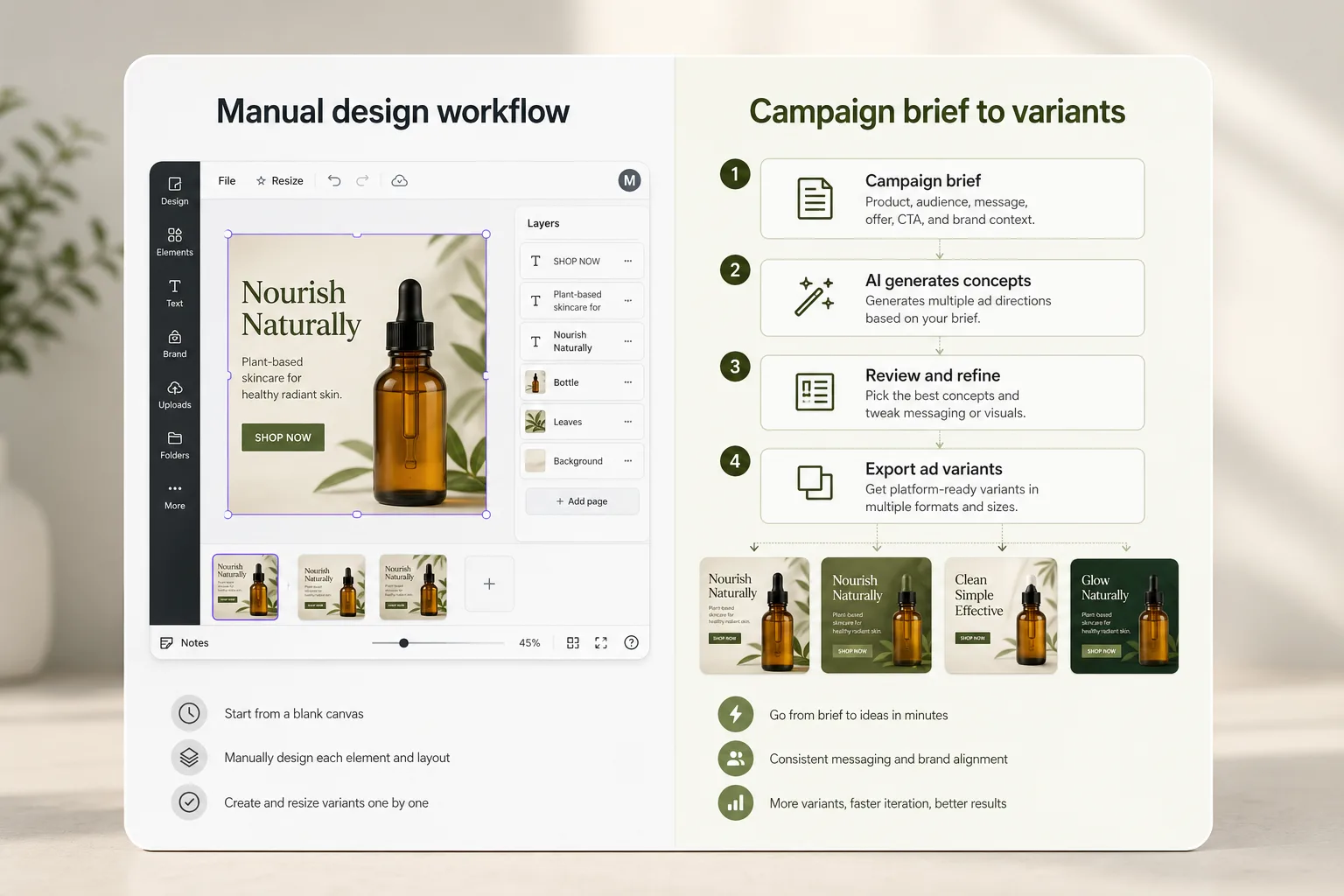
Canva remains useful for broad brand design, decks, documents, and manual layout control.
The better fit depends on whether the job is general design or repeatable ad variant production.
Decision framework
How Avocad compares with Canva
Compare how each workflow fits campaign briefs, creative review, and team handoff.
| Criterion | Canva | Avocad | Review note |
|---|---|---|---|
| Starting point | Template, canvas, or manual layout | Brand, product, URL, and campaign brief | Avocad is stronger when the goal is ad variants, not general-purpose design. |
| Best use | Presentations, social posts, documents, brand assets | Paid ad concepts, product ads, and platform-specific creative variants | The tools can coexist in a marketing workflow. |
| Creative review | Designer manually adapts each variation | Generate options, then review claims, crop, copy, and brand fit | Human review remains important before publishing. |
| Pricing model | Free tier with paid Pro and Teams plans | Free trial, then usage-based plans | Compare based on your expected creative volume per month. |
| Brand kit | Manual brand kit setup with fonts, colors, logos | Auto-extracted from URL plus manual refinement | Avocad reduces setup time for teams with an existing web presence. |
| Multi-format output | Manual resize or Magic Resize (paid) | Multiple ratios generated from one brief | Useful when campaigns span feed, story, and display placements. |
When Canva may fit
Choose Canva when you need broad design control across many content types.
When Avocad may fit
Choose Avocad when you need campaign-ready ad variants from brand and product context.
Migration checklist
How to evaluate without risking campaign quality
- Keep Canva for general brand and document design.
- Use Avocad for paid-social creative ideation and variant production.
- Review final creative for brand, claim, and placement fit before launch.
When to use each tool
Use Canva for broad assets
Decks, documents, simple social posts, and brand collateral benefit from manual layout control.
Use Avocad for ad variants
Product, offer, and audience inputs can become multiple creative directions faster.
Review before publishing
No generated creative should skip human review for claims, fit, and campaign context.
Operator guide
Practical Canva vs Avocad evaluation
You should be able to decide where manual design software fits your workflow and where an ad-focused generation workflow reduces production drag.
This decision is less about "better tool" and more about repeatable jobs in your team. Evaluate by workload pattern, not brand familiarity.
Step 1
List recurring creative jobs
Separate one-off brand design tasks from recurring paid ad variant tasks. Most teams discover the bottleneck is repeat production, not ideation.
Deliverable
Creative job inventory
Watch out for
Comparing tools without defining recurring work.
Step 2
Measure production effort per campaign
Track how many edits are needed from brief to publishable output in each tool. Time-to-review-ready is usually more useful than "looks good" scoring.
Deliverable
Time and revision scorecard
Watch out for
Choosing based on first impression aesthetics only.
Step 3
Keep a hybrid stack where useful
Many teams keep Canva for broad brand assets and use Avocad for paid-social variant throughput. The right answer can be combination, not replacement.
Deliverable
Hybrid workflow decision
Watch out for
Forcing a full migration before testing campaign fit.
Comparison mistakes to avoid
Assuming one tool should do every design job
You optimize for platform breadth instead of speed to outcome.
Better move: Assign tools by job type and campaign frequency.
Ignoring review effort in evaluation
Hidden editing time erodes campaign velocity.
Better move: Score output by publish readiness, not only appearance.
Skipping real campaign tests
Tool choice becomes opinion-driven rather than evidence-driven.
Better move: Run one live brief end-to-end before deciding.
Frequently asked questions
Is Avocad a Canva replacement?
Not for every design task. Avocad is more focused on ad creative generation, while Canva is broader general-purpose design software.
Can I use both tools?
Yes. Many teams can use Avocad for ad variants and Canva for wider brand collateral.
Is Canva free?
Canva has a free tier. Advanced features like Magic Resize and brand kits require a paid plan. Avocad offers a free trial before paid plans.
Which tool is faster for ad production?
Avocad is typically faster when the job is producing ad variants from a campaign brief. Canva is faster for one-off social graphics and presentations.
Does Avocad auto-extract brand identity?
Yes. Avocad scans your website URL to extract colors, fonts, tone, and product context. Canva requires manual brand kit setup.
Try an ad-focused workflow next to your design stack
Use Avocad when the job is producing ad variants from campaign context.
Create ad variants